

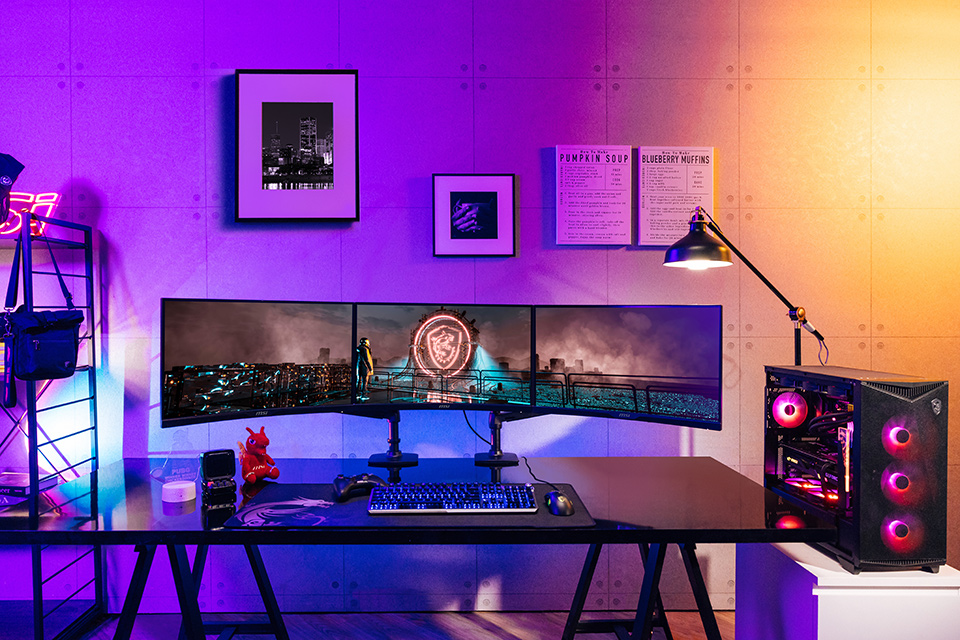
Imagine immersing yourself in an ultra-wide field of view, where your peripheral vision is alive with action, enhancing your gameplay to new heights. That’s the power of a triple monitor setup! Whether you’re playing intense first-person shooters, exploring vast RPG worlds, or managing multiple tables in an online poker game, a triple monitor setup can transform your gaming experience.
Setting up a triple monitor configuration can seem daunting, especially if you’re new to PC hardware. But don’t worry—this guide will walk you through the process step by step, addressing common challenges and helping you achieve the ultimate gaming setup.
Why Go for a Triple Monitor Setup?
1. Immersive Gaming Experience
A triple monitor setup expands your field of view, allowing you to catch details and experience games the way developers intended. It’s particularly useful for racing simulators, flight simulators, and expansive open-world games.
2. Increased Productivity
Triple monitors aren’t just for gaming. If you’re a streamer, designer, or multitasker, having more screen real estate makes managing tasks effortless.
3. Competitive Edge
Gamers playing competitive titles like slot games or battle royale games can benefit from the ability to monitor additional information without disrupting gameplay.
Components You’ll Need
Before diving into the setup, make sure you have all the required components:
- Monitors: Three monitors with thin bezels are ideal for seamless visuals.
- Graphics Card: A GPU that supports multi-monitor output is crucial. Look for options with at least three video output ports.
- Monitor Mounts or Stands: Ensure your monitors are stable and aligned properly.
- Cables: HDMI, DisplayPort, or DVI cables based on your monitor and GPU.
- PC Hardware: Your CPU, RAM, and power supply should be capable of handling the increased load.
Step 1: Check Compatibility
Assess Your Graphics Card
The first step is ensuring your graphics card can support a triple monitor setup. Modern GPUs from NVIDIA and AMD usually support three or more monitors. Check the available ports—you’ll typically need a combination of HDMI, DisplayPort, or DVI.
Monitor Resolution and Refresh Rate
To ensure smooth performance, your monitors should have the same resolution and refresh rate. For gaming, 1080p at 144Hz is a popular choice, but higher resolutions like 1440p or 4K may offer better visuals if your GPU can handle it.
Step 2: Arrange Your Monitors
Choose Your Layout
There are two common layouts for triple monitor setups:
- Landscape Mode: Ideal for immersive gaming experiences and productivity tasks.
- Portrait Mode: Great for coding, editing, and certain simulation games.
Positioning
Place the center monitor directly in front of you, with the other two angled slightly towards you for a curved effect. Use adjustable monitor mounts for precise alignment.
Step 3: Connect Your Monitors to the GPU
Using the cables you’ve prepared, connect each monitor to your GPU. Match the cables to the appropriate ports on your GPU and monitors. If you’re using adapters, ensure they are compatible with your GPU’s specifications.
Step 4: Configure Display Settings
Windows Settings
- Right-click on the desktop and select Display Settings.
- Under “Multiple Displays,” choose “Extend these displays.”
- Arrange the monitors by dragging them to match your physical setup.
Graphics Card Software
Use software like NVIDIA Control Panel or AMD Radeon Software to fine-tune settings. You can adjust resolution, refresh rate, and color calibration for each monitor.
Step 5: Optimize Your Gaming Experience
Enable NVIDIA Surround or AMD Eyefinity
These features allow your triple monitors to function as one large display, providing a panoramic view.
Adjust In-Game Settings
Not all games natively support triple monitors. Check the settings to enable a wider aspect ratio and adjust the field of view (FOV) for the best experience.
Test Performance
Run a few games to test performance. Pay attention to frame rates and adjust graphical settings as needed to balance visuals and performance.
Common Pain Points and Solutions
1. “My GPU Can’t Handle Three Monitors”
If your GPU struggles, consider upgrading to a more powerful model or reducing graphical settings in games. GPUs like the NVIDIA RTX 3060 or AMD RX 6700 XT are great mid-range options for triple monitor setups.
2. “Bezel Interruption”
Thick bezels can disrupt the immersive experience. Look for monitors with ultra-thin bezels or invest in bezel-less designs.
3. “Cable Management”
With multiple monitors come multiple cables. Use cable organizers or zip ties to keep your setup neat and tidy.
Gaming on Triple Monitors
Enjoying Slot Games
Triple monitors make online slot gacor games more engaging, offering expanded visuals that feel more immersive. Games like these often benefit from larger screens, creating a casino-like atmosphere right at home.
Playing Poker Games
Poker games gain an edge on a triple monitor setup by enabling players to manage multiple tables simultaneously without clutter. With all relevant information in view, you can focus on strategizing and winning big.
Conclusion: Take Your Gaming to the Next Level
A triple monitor setup is a game-changer for any PC gaming enthusiast. It enhances immersion, improves multitasking, and provides a significant competitive edge. While setting it up requires planning and investment, the rewards are well worth the effort.
So, gather your components, configure your setup, and dive into the world of triple monitor gaming. Whether you’re spinning reels in a slot game or planning your next big move in a poker game, your gaming experience is about to get an extraordinary upgrade!
